Quick Enquiry
Thank you for your query!
Your inquiry has been received. We appreciate your interest.
Our team will review your message and get back to you as soon as possible.

Thank you for your query!
Your inquiry has been received. We appreciate your interest.
Our team will review your message and get back to you as soon as possible.




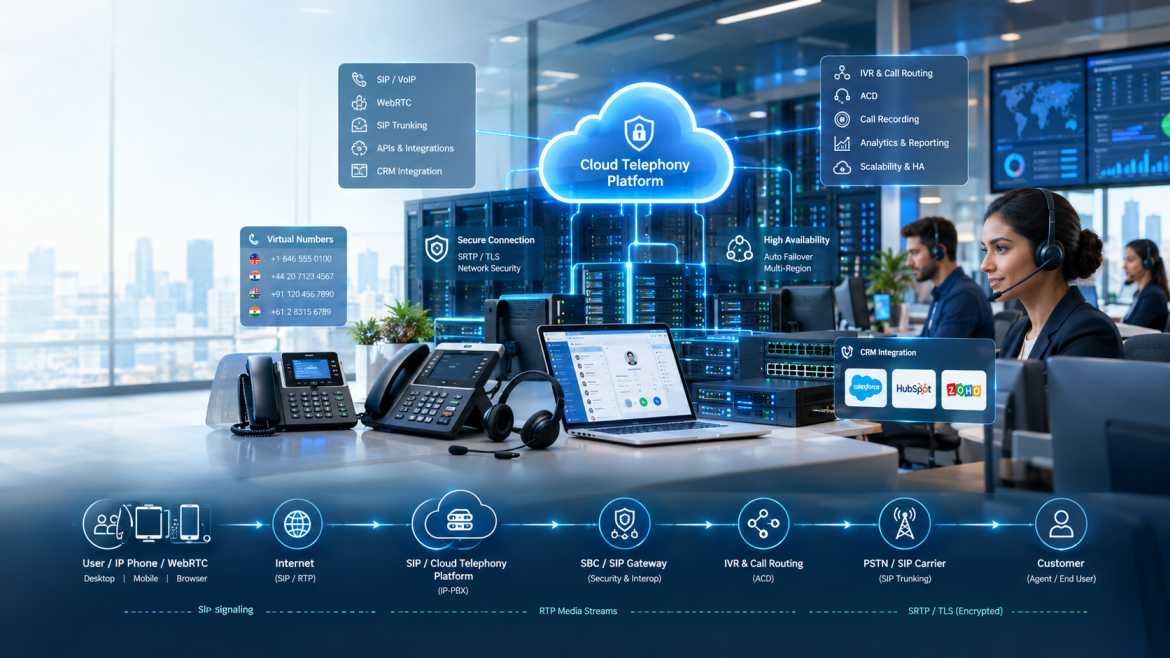
In practice, selecting a cloud telephony service provider is an infrastructure decision masquerading as a software decision. The dashboard, the IVR builder, the CRM integration – all of that sits on top of a stack of SIP signalling, media transport, carrier connectivity, and redundancy engineering that most buyers never see until something goes wrong: a dropped call during a customer escalation, a registration failure during a product launch, one-way audio during a sales demo.
This guide is for the people who have to actually evaluate that stack—IT managers, CTOs, telecom managers, and call-center leads—not the people comparing marketing feature lists. It explains what a cloud telephony service provider actually is and how it differs from on-premise PBX, hosted PBX, and CPaaS; how a call technically flows from a user’s device through SIP signalling, call routing, and RTP media to a destination number; the core technologies involved (SIP, RTP, SRTP, WebRTC, SIP trunking, SBCs, and codecs); how APIs and CRM integrations actually work; what security and high availability actually require; and a practical framework for evaluating a provider before you sign a contract.
We are not trying to sell you a list of features. It’s to make sure you know enough about the underlying architecture to ask a provider the right questions and to know the difference between a provider who is running real telecom infrastructure and one who is reselling somebody else’s.
A cloud telephony service provider is a company that provides business telephone services over the internet (call handling, routing, IVR and voice connectivity) using infrastructure that is centrally hosted. This is as opposed to an organization having to own and maintain physical PBX hardware on-site. The provider owns (or resells access to) the SIP signalling infrastructure, call routing logic, and carrier connectivity required to place and receive calls and exposes that functionality to businesses via phones, softphones, or APIs.
This is useful to compare with the related but different models with which it is often confused:
|
Model |
Where Infrastructure Lives |
Who Maintains It |
Typical Deployment |
|
Traditional PBX |
On-premises, proprietary hardware |
The business (or a local telecom vendor) |
Physical PBX cabinet, analog/digital extensions |
|
IP-PBX |
On-premise, IP-based hardware or software |
The business's IT team |
Server or appliance running SIP-based call control on-site |
|
On-premise telephony |
On-premise (a broad term covering the above) |
The business |
Physical infrastructure at the business's location |
|
Hosted PBX |
Off-site, provider-owned data center |
The provider |
Businesses rent access to a provider-hosted IP-PBX instance |
|
Cloud telephony |
Off-site, provider's cloud/data center infrastructure |
The provider |
Businesses consume telephony as a service, often via web dashboard/API. |
|
CPaaS (Communications Platform as a Service) |
Off-site, provider's cloud infrastructure |
The provider |
Businesses build custom communication workflows via APIs, rather than using a pre-built phone-system UI |
But the main practical difference is this: hosted PBX is essentially a rented version of a traditional PBX feature set (extensions, IVR, voicemail),, whereas CPaaS is lower-level—it exposes voice, SMS, and related capabilities as programmable building blocks for developers to create custom applications. Both come under the umbrella term of cloud telephony, and most business buyers are in fact looking at a hosted-PBX style offering with some level of API/CRM integration layered on top.
Here's what the actual technical path a call takes looks like, using an outbound call from a sales agent's softphone as an example:
1. User/device—the agent initiates a call using a softphone, SIP-enabled desk phone, or WebRTC-enabled browser client.
2. Internet/network—the call request leaves the device of the agent through the internet (or a private network link) to the cloud telephony platform.
3. SIP signalling—The client sends a SIP INVITE to the platform with the destination number and proposed media parameters using SDP.
4. Cloud telephony platform – receives the SIP signalling, authenticates the request, and forwards it to the call routing engine.
5. Call-routing engine – evaluates dial-plan rules, business-hour logic or IVR/ACD configuration to determine how the call should be routed.
6. IVR/ACD (if applicable, normally on inbound calls)—provides menu options or routes the call to an available agent depending on the configured logic.
7. PSTN/SIP carrier – If the destination number is outside of the platform itself, the platform hands the call off to its underlying carrier connectivity (a SIP trunk or direct carrier interconnect).
8. Destination number—the call lands on a fixed line, mobile number, or another SIP endpoint.
9. RTP media stream—after the signalling sets up the call, the actual voice audio goes as RTP packets directly (or through a media relay) between the platform and the endpoints—this is a different data path from the SIP signalling that set the call up.
The key difference: media vs. signalling. SIP signalling is done over the “control channel” that is used to set up, modify, and tear down the call, but it carries no voice audio itself. RTP is the “media channel." It carries the actual encoded voice packets once the call is set up. These are separate paths, both logically and often physically, and this is why you can get a call ring and connect successfully (signalling working) and yet never actually get any audio (a media/RTP problem) — a distinction that becomes important later in the troubleshooting section.
SIP → Call Control → Routing → RTP → PSTN/End Point
Cloud Telephony Architecture –
A sample cloud telephony architecture from user to customer:
User
↓
Internet
↓
SIP / WebRTC
↓
Cloud Telephony Platform
↓
SBC / SIP Gateway
↓
Call Routing / IVR / ACD
↓
PSTN / SIP Carrier
↓
Customer
• User endpoints are the physical or software device an agent or customer uses, such as a desk IP phone, a softphone application, or a WebRTC-enabled browser tab.
• SIP clients/softphones / IP phones – implement the SIP protocol stack for registration and making/receiving calls via the platform.
• WebRTC clients—browser-based endpoints that use WebRTC’s real-time media and signalling APIs, generally for click-to-call widgets or browser-based agent consoles.
• SIP gateway—bridge SIP to other telephony interfaces as required (e.g., bridging to PRI/analog infrastructure).
• SBC (Session Border Controller)—located at the edge of the network, it provides security, NAT traversal, and protocol normalization between the public internet and the internal SIP infrastructure of the platform (see below).
• Application server – runs the call-control logic, IVR engine,, and business rules of the platform.
• IVR Engine—plays back configured menu trees, prompts, and self-service logic to inbound callers
• Call routing engine — Uses dial-plan, time-of-day, skill-based, or geographic routing rules to determine where calls should go.
• Database – contains configuration, call detail records (CDRs), and account information.
• API gateway – provides REST APIs to external applications to expose platform capabilities (call initiation, call status, recordings, number management).
• CRM integration layer – Links call events and customer data between the telephony platform and business systems such as a CRM or helpdesk.
* Analytics layer - aggregates call data into dashboards and reports (call volume, call duration, disposition, agent performance).
• PSTN/carrier connectivity – The underlying trunk connections (SIP trunks or direct carrier interconnects) that enable calls to actually reach landlines and mobile numbers outside the platform.
SIP (Session Initiation Protocol, IETF RFC 3261) is the signalling protocol that powers nearly every modern cloud telephony platform. Core SIP methods that pertain to how a platform operates:
• REGISTER – a device/trunk indicates to the platform its availability and location.
• INVITE - starts a call, passing suggested media parameters (codec, IP, port) in an embedded SDP body.
ACK — acknowledges the final response to an INVITE and completes call setup.
• CANCEL — cancels a call attempt before it is answered.
• GOODBYE – ends an active call.
• OPTIONS — asks what a given endpoint is capable of or if it is available. Used often for keepalive between a platform and its carrier trunks.
When a SIP session is established, the actual voice audio is carried over Real-time Transport Protocol ( RTP, RFC 3550). It runs over UDP; voice can tolerate a certain amount of loss much better than the penalty of latency that TCP retransmission imposes. Each packet carries a sequence number and timestamp so the receiving end can reconstruct audio timing and detect loss.
SRTP Secure RTP) encrypts the RTP media stream, protecting the audio of calls from sniffing on the network path between the platform and its endpoints or carriers. It is often used with SIP signalling secured with TLS, which protects both the call setup and the call content end to end.
WebRTC is a W3C/IETF standard that allows real-time audio (and video) communication inside a web browser, without a plugin. This is what powers browser-based softphones and click-to-call widgets. The browser handles media capture, encoding, and transport natively and communicates with the platform via a signalling mechanism (usually a WebSocket carrying SIP or a SIP-like protocol) and RTP/SRTP for media.
SIP trunking is how a cloud telephony platform (or on-premises IP-PBX) gets connectivity to the PSTN without physical phone lines—a carrier provides inbound/outbound call capacity over a SIP-based connection, the capacity being sold per concurrent channel (rather than physical lines). That’s how most cloud telephony providers actually get to the traditional phone network.
An SBC is installed at the edge of a provider’s internal SIP infrastructure and the public internet or carrier network. Its functions are
• Security—protects internal call-control infrastructure from direct exposure to the internet and filters malicious SIP traffic.
• NAT traversal—advertises correctly reachable addresses in SIP/SDP when endpoints are behind network address translation, avoiding one-way or no-audio issues.
• Protocol normalization—resolves inconsistencies in SIP implementation between different vendors’ equipment and carrier networks.
• Traffic control—enforces call admission control and rate limiting to protect platform stability.
• Fraud prevention: Identifies and blocks abnormal calling patterns that could be signs of toll fraud or SIP scanning.
|
Codec |
Characteristics |
Approx. Bandwidth (payload) |
Typical Use |
|
G.711 |
Uncompressed, high quality, minimal encoding delay |
~64 kbps |
LAN calls, short-haul, maximum compatibility |
|
G.729 |
Compressed, moderate quality, higher DSP load |
~8 kbps |
Bandwidth-constrained links, remote/branch offices |
|
Opus |
Flexible bitrate, modern design |
Variable, low to high |
WebRTC and modern SIP endpoints were supported |
The trade-off is bandwidth versus quality and processing load. G.711 provides the cleanest audio at the expense of more bandwidth per call, while compressed codecs such as G.729 reduce bandwidth substantially at a modest quality cost and higher DSP/CPU demand. Codec selection has a direct impact on the number of concurrent calls supported by a given bandwidth allocation.
• IVR (Interactive Voice Response)—automated menu trees that let callers navigate themselves ("Press 1 for sales") before talking to an agent or resource.
• Call routing—logic to determine how to route an inbound call based on the number dialed, time of day, caller location, or business rules.
• ACD (Automatic Call Distribution)—Distributes inbound calls to available agents based on skill, availability, or load balancing rules.
• Call forwarding—redirects calls to another number or extension, based on configured conditions.
• Call queues—hold incoming calls when all agents are busy and often make announcements about queue position or estimated wait times.
• Call recording—records audio of calls for quality assurance, training, or compliance purposes.
• Call monitoring—allows supervisors to listen in on live calls for quality control.
• Whisper call – allows a supervisor to talk to the agent during a live call (without the customer listening)
• Call barging—allows a supervisor to join an ongoing call directly.
• Number masking—displays a substitute number instead of a caller’s or agent’s actual number, usually in marketplace/delivery platforms to protect user privacy.
• Virtual numbers—phone numbers not associated with a physical line and used for local presence or campaign tracking.
• DID numbers (Direct Inward Dialing)—individual phone numbers that ring directly to a specific extension or user without going through a receptionist/attendant.
• Click-to-call—starts a call from a web page, CRM record, or application with one click, typically via an API call.
• Voicemail records messages if a call is not answered.
• Call analytics—summary reporting on call volume, length, and results.
• Live dashboards – real-time views of call volume, agent availability, and queue status
• Call disposition—agent-assigned outcomes for completed calls (e.g., resolved, follow-up needed) that feed into reporting and CRM workflows.
• Agent management—creating agent accounts, skills, availability, and permissions.
• Multi-level IVR—nested menu structures to support complex routing needs.
• Business-hour routing—automatically alters how calls are handled based on configured operating hours.
• Geographic routing—routes calls based on the caller’s or a virtual number’s geographic association.
• Failover routing—call routing automatically to an alternate destination if the primary route is unavailable.
The majority of modern cloud telephony platforms expose their functionality through REST APIs. This allows external software to programmatically initiate calls, check status, and retrieve recordings, not just through a web dashboard.
• REST APIs – HTTP-based endpoints to initiate calls, manage numbers, and retrieve call data.
• Webhooks—instead of the business having to poll for updates, the platform pushes real-time event notifications (call started, call ended, recording ready) to a URL the business controls.
• Authentication—usually API keys or OAuth-based tokens that define what is allowed for each integration.
• Click-to-call APIs—make an outbound call from an application (e.g., a CRM “Call” button) with a single API request.
• SMS APIs—send/receive text messages as well as voice, which is common in platforms that offer both channels.
• Voice APIs—programmatic control of call flow, frequently used to create custom IVR logic outside of the platform’s built-in visual IVR builder.
• Call-status APIs—request the status of a particular call in real-time or historically.
• Call-recording APIs—grab recorded call audio programmatically for storage or analysis elsewhere.
• Number Management APIs – programmatically provision, configure, or release DID numbers.
Typical use cases: CRM systems (automatic logging of calls against customer records), ERP systems (linking call activity with order or account data), helpdesk software (creating support tickets from missed or completed calls), e-commerce platforms (order-related notifications or click-to-call support), contact-center software (routing and agent-desktop integration), and marketing automation platforms (triggering calls or logging call outcomes against campaign data).
CRM (agent clicks “Call”) > Call to Cloud Telephony Platform API
→ The platform calls the customer number using SIP.
→ Call is answered; RTP media flows between agent and caller.
The platform sends a webhook on the call end with the call duration/outcome.
→ Calls are automatically logged to the customer record in CRM.
This pattern of CRM-triggered call + webhook-driven logging is the backbone of most sales and support workflows built on cloud telephony APIs. It’s worth testing explicitly with any candidate provider before committing, as webhook reliability and API documentation quality vary significantly between vendors.
Security in a cloud telephony deployment is a function of architecture, configuration, and operational discipline, not one feature. Areas of application:
• SIP security—Each endpoint and trunk is authenticated on registration; no anonymous SIP is accepted.
• TLS—encrypts SIP signaling as it travels, protecting credentials and call metadata from being intercepted.
• SRTP – encrypts the actual voice media stream.
• API authentication—API keys or OAuth tokens, scoped as narrowly as possible for what an integration actually needs.
• Role-based access control—restricting what different types of users (agents, supervisors, admins) can see and configure in the platform.
• IP restrictions—where possible, restrict SIP or API access to known, trusted IP ranges.
• Fraud detection—monitoring for abnormal calling patterns (unusual destinations, volume spikes) that point to compromise.
• Rate limiting—Limit the rate of API and SIP requests to limit abuse and brute-force attack surface.
• DDoS protection—infrastructure-level mitigation against volumetric attacks on signaling or API endpoints.
• Call-recording protection—access control and encryption of stored recordings, which often contain sensitive customer information.
•Secure storage—encryption at rest for CDRs, recordings, and account information.
• Monitoring and logging—visibility into registration attempts, API usage, and call patterns for operational and security purposes.
• Access management—administrative access control to the platform itself (including for the provider’s own staff)
• Data privacy—handling of customer call data in accordance with relevant regulations, including location of data storage and processing.
• Backup and disaster recovery—restore configuration and call data in the event of an infrastructure failure.
• SIP registration attacks—automated attempts to register as a legitimate SIP endpoint using credentials that have been guessed or exposed.
• Toll fraud—a real financial loss occurring when an account is compromised and used to make unauthorized outbound calls (usually to a premium-rate international number).
• Call spoofing—disguising the caller ID to appear as a trusted number.
• Credential theft—stolen SIP or dashboard/API credentials via phishing or weak password hygiene.
• Brute-force attacks—repeated automated login or registration attempts against weak login credentials.
• API abuse—exploitation of exposed APIs, from data scraping to fraudulent call initiation, especially where API keys are weakly scoped or exposed.
They are able to address these with layered defenses such as SBC-level filtering, authenticated signaling, encrypted transport, rate limiting, and active monitoring rather than relying on any single control. It's reasonable and advisable to ask a prospective provider specifically how they deal with each of these threat categories, rather than accepting a general "we're secure" assurance.
• Redundant infrastructure – remove single points
points of failure with duplicate servers, network paths, and power.
• Load balancing – Spreading call and signaling traffic across multiple servers to avoid overloading any one node.
• Geographic redundancy—infrastructure spread out over multiple data center locations, so a regional outage doesn’t take down the entire platform.
• Automatic failover—when a component fails, traffic is automatically sent to healthy infrastructure, ideally without any human intervention.
• Backup systems—copies of configuration and call data.
• Disaster recovery—documented, tested procedures for service restoration after a major infrastructure failure.
• Network redundancy—multiple, diverse network paths between the platform and the internet/carriers.
• Carrier redundancy—connectivity to more than one underlying carrier, so a single carrier outage doesn’t remove PSTN reachability.
• Monitoring—automated and ongoing evaluation of infrastructure health, call quality metrics, and capacity.
• SLA (Service Level Agreement)—a formal commitment to a certain level of uptime and response for support.
• Uptime—the actual historical uptime of the platform, which is something that businesses should ask providers to demonstrate, rather than accept as an unsubstantiated claim.
• Horizontal scaling—adding more servers/capacity to support growth rather than being limited by the capacity ceiling of the single server.
Why is this important for enterprises and contact centers, especially: A contact center’s revenue and customer relationships are directly exposed to any telephony outage—unlike many business applications, there is no meaningful offline fallback for “the phones don’t work.” The redundancy and failover architecture of a provider is not some side technical detail; it's near the heart of the value proposition of choosing cloud telephony over a single on-premises PBX in the first place.
• Latency—the time it takes for a voice packet to travel from sender to receiver. High latency causes conversational lag and talk-over; anything with a round-trip delay much beyond about 300ms starts to feel noticeably unnatural in conversation.
• Jitter—variation in packet arrival timing. A jitter buffer smooths this out, but at the cost of a small added delay. If the jitter is too great, the buffer may discard late-arriving packets, resulting in audible gaps.
• Packet loss—lost RTP packets produce clicks, gaps, or robotic audio. The impact depends on the loss-concealment behavior of the codec and on the amount of loss.
• Bandwidth—The total throughput needed scales linearly with the number of simultaneous calls and the codec used.
• QoS (Quality of Service)—prioritizing SIP/RTP traffic (often with DSCP marking) over less time-sensitive data traffic assists in preserving voice quality on shared or congested links.
Example of a practical bandwidth estimation: using G.711 (the audio payload itself is about 64 kbps, but add IP/UDP/RTP packet header overhead, and the real per-call figure is often 80-100 kbps depending on packetization settings), a business with 20 concurrent calls needs to budget for about 1.6-2 Mbps of dedicated bandwidth just for that call volume—not including other network traffic on the same link. The same 20 calls can be moved to a compressed codec such as G.729 (about 8 kbps payload, with proportionately less overhead overall) and use a fraction of the G.711 bandwidth but will have slightly less quality audio and a higher DSP load on the endpoint doing the encoding. Actual numbers will vary depending on the exact packetization interval and network configuration. This should be considered a planning starting point, not an exact universal formula.
|
Factor |
Traditional PBX |
Cloud Telephony |
|
Infrastructure |
Physical hardware on-premises |
Provider-hosted, off-site infrastructure |
|
Deployment |
Weeks to months, physical installation |
Typically days, largely configuration-based |
|
Scalability |
Limited by installed hardware capacity |
Scales by provisioning additional capacity/licenses |
|
Maintenance |
The business's IT team or a local vendor |
Handled by the provider |
|
Remote work |
Limited without additional VPN/remote-extension setup |
Native—accessible from any internet-connected device |
|
Integrations |
Often limited or requires custom middleware |
Commonly API-based, designed for CRM/business-tool integration |
|
Reliability |
Dependent on the business's own infrastructure and power |
Dependent on the provider's redundancy and SLA |
|
Cost model |
Higher upfront capital expenditure, hardware depreciation |
Typically subscription/usage-based operating expenditure |
|
Updates |
Manual, often requiring vendor visits or firmware upgrades |
Provider-managed, often continuous |
|
Analytics |
Often limited or add-on |
Frequently built-in, real-time dashboards |
|
APIs |
Rare, vendor-specific if present at all |
Commonly a core product feature |
This comparison is intentionally not all-encompassing — some organizations with strict data-residency requirements, unreliable internet connectivity, or sunk investment in PBX hardware may still find on-premises or hybrid deployments genuinely preferable for their particular circumstances.
These terms are related but not interchangeable, and confusing them leads to real confusion in procurement conversations.
VoIP (Voice over IP) is the technology, a general way to transmit voice as digitized packets over an IP network using protocols such as SIP and RTP. It is the transport mechanism.
Cloud telephony is a broader service model—a hosted communications infrastructure and bundle of business features (IVR, call routing, analytics, integrations) a provider offers as a service, which typically runs on VoIP/SIP technology underneath, but is the full managed offering and not just the transport layer.
In simple terms: VoIP is the plumbing; cloud telephony is the fully-managed building that’s built on top of that plumbing, including the business logic, feature set and support that takes the raw voice-over-IP capability and makes it a usable business phone system.
Choosing the Right Cloud Telephony Service Provider
• Infrastructure—does the provider have actual telecom infrastructure (SBCs, carrier interconnects), are they reselling another platform’s capacity?
• Network reliability—what is the redundancy at the network and data center level?
• SIP support—if relevant, does the platform support standard SIP for interoperability with your existing IP-PBX or SIP-capable hardware?
• API capabilities—how complete and well-documented are the REST API and webhook system?
• CRM integrations—Do they have integrations with your specific CRM/helpdesk platform? Are they pre-built, or would they need custom development?
• Security—what encryption (TLS/SRTP), access control, and fraud-detection measures are in place, in concrete terms?
• Scalability—what are the real limits to how capacity scales as call volume or agent count increases?
• Call quality—what codec support exists, and what quality metrics or guarantees does the provider offer?
• Redundancy—is there real geographic and carrier redundancy, or is there a single point of failure?
• Monitoring—how much visibility does the business have into real-time platform health and call quality?
• Reporting/Analytics—How granular and exportable is the reporting/analytics layer?
• Number availability—does the provider have DIDs in the particular regions/cities you need for your business?
• Support—What support channels and response-time commitments are there specifically for issues affecting production?
• SLA—Is there a documented, enforceable uptime and support SLA, not just a marketing statement?
• Compliance—does the provider’s handling of data comply with your industry’s regulatory requirements (important in healthcare, finance, and similar sectors)?
• Pricing—Is your pricing model (per-seat, per-minute, per-channel) clear and predictable at your expected volume?
• Documentation—Is the API and platform documentation complete, up-to-date, and usable by your technical team?
• Disaster recovery—Do you have a documented and tested recovery process for a major outage?
• What carrier(s) do you actually route calls through, and is there redundancy across more than one?
• What is your actual measured uptime for the past 12 months, and can you provide proof?
• What encryption is applied to signaling and media by default vs. optional add-on?
• How are call quality and service continuity is impacted if your primary data center goes dark?
• Can we test API and webhook integration with our specific CRM before signing a contract?
Call Centers – ACD, call and real-time monitoring directly support high-volume inbound call handling and supervisor oversight.
• Customer support—Call logging and disposition tracking linked to CRM reduces manual data entry and improves case history accuracy.
• Sales teams—Click-to-call from CRM records and automated call logging speeds up outbound prospecting workflows.
• E-commerce—number masking protects customer privacy on delivery/logistics calls, and click-to-call enables post-purchase support.
• Logistics—virtual numbers and call routing help dispatch and delivery coordination across distributed teams and vehicles.
• Healthcare—call recording and structured routing support compliance and patient-communication workflows, subject to verification with the provider of relevant regulatory requirements.
• Banking/financial services—compliance and fraud prevention requirements are met by secure, recorded, and auditable call handling.
• Education—IVR and virtual numbers handle admissions queries and multi-department routing, without the need for a large reception staff.
• Real estate—Call tracking and number masking support lead generation campaigns and agent-customer privacy.
• SaaS companies – API-based Telephonynables integration of voice/click-to-call into a product.
• Enterprises—geographic redundancy and multi-site routing support distributed offices under a single unified numbering and routing scheme.
• Remote teams—access is not tied to a device, so agents can work from anywhere with a reliable internet connection without the need for physical desk-phone hardware.
Step 1 – Evaluate business requirements. Figure out call volume, features needed (IVR complexity, integrations, recording/compliance needs), and number of users/agents.
Step 2 – Numbering and carrier planning: collect the necessary DID numbers, geographic coverage, and whether existing numbers are to be ported.
Step 3: Network readiness audit. Check existing Internet bandwidth, latency, and network equipment (router/firewall SIP handling, including checking for SIP ALG interference) against the expected number of concurrent calls.
Step 4. Architectural Design Plan: call flows, routing logic, integration points, and redundancy requirements before configuring.
Step 5—Configure IVR and call flow. Build out menu structures, business hour rules, and routing logic in the platform.
Step 6 — CRM/API integration. Connect to CRM, helpdesk, or other business systems using API/webhook and test the integration thoroughly.
Step 7—Configuring security. Set authentication, encryption, access control, and fraud prevention before going live.
Step 8 – Test. Test inbound/outbound calling, IVR flows, failover behavior, and integration accuracy under realistic conditions.
Step 9—Moving. Migrate away from legacy infrastructure, preferably using a phased or parallel-run approach to minimize cutover risk for business-critical lines.
Step 10: Monitor and optimize. Continually monitor call quality KPIs, agent performance analytics, and system health, and tune configuration as usage patterns change.
Bad call quality
Causes include packet loss, jitter, latency, network congestion, or a codec mismatch/misconfiguration. Diagnostic steps: Look at RTCP reported loss/jitter statistics, if available. Check that the QoS/DSCP markings are actually being honored end to end (not just at one hop). Check that the negotiated codec is what you expect.
Missed Calls
Possible causes: SIP session timers expiring due to missed re-INVITE/refresh, NAT table entries timing out mid-call, general network instability, or carrier-side issues. Diagnostic: verify SIP session-timer config consistency across endpoints. If the issue is tied to call duration, investigate NAT keepalive settings.
Single-Track Audio
Possible causes include RTP routing failures, NAT misconfiguration advertising an unreachable address in the SDP, firewall rules blocking RTP in one direction, or SIP ALG interference on a router in the path. Diagnostic approach: Make sure the RTP port range is open in both directions, verify the IP advertized in SDP is reachable, and if the issue is intermittent or NAT-related, disable SIP ALG on any consumer/SMB-grade router in the path.
Registration Failures
Possible reasons: Wrong credentials, firewall blocking the SIP signaling port, SIP configuration mismatches (transport type, server address), or authentication method mismatch between the endpoint and platform. Diagnostic approach: Don’t assume one likely cause; directly verify credentials and server address, ensure the signaling port is open in both directions, and check logs on both the endpoint and platform sides for a specific rejection reason.
This layered, diagnostic approach—separating media-layer problems from signaling-layer problems, and network-layer problems from application-layer problems—is how you actually resolve problems in cloud telephony efficiently, not by guessing what needs to be fixed.
Is Cloud Telephony Safe?
There is no single honest, universal answer to the question, "Is cloud telephony secure?" Security is a property of the specific architecture, configuration, and operational practices in place, not an inherent characteristic of the technology category itself. A well-architected deployment with authenticated SIP, encrypted signaling & media (TLS/SRTP), properly scoped API access, active fraud monitoring, and a provider with real redundancy can be very robust. No matter the provider or platform, a poorly configured deployment—weak credentials, unencrypted signaling, an exposed management interface, no monitoring—poses real risk.
The practical takeaway for buyers is to assess security as a collection of specific, verifiable controls (ask what is enabled by default versus optional) and not to accept a generic “we’re secure” or “100% secure” claim from any provider—that framing alone is a cue to ask more questions, because no internet-connected system can honestly claim absolute security.
•Managed infrastructure—The provider manages the underlying SBC, carrier interconnect, and server infrastructure, taking that operational burden off the business.
• Scalability – capacity can generally be scaled without additional hardware procurement cycles.
• Faster deployment—configuration-based setup is usually faster than physical PBX installation.
• Less hardware dependency – less equipment to buy on-site, maintain, and eventually replace.
• Centralized Management—Single dashboard/API for configuration for potentially distributed teams or offices.
• Integration capabilities—API-driven connectivity to business systems for more automated workflows than legacy PBX hardware typically allows.
• Analytics—Native reporting means you don’t have to use separate call-tracking tools.
• Reliability—A truly well-architected provider can build in redundancy far beyond what a single business's own infrastructure could realistically achieve.
• Security—dedicated telecom security expertise, applied consistently, and that’s totally dependent on a given provider’s practices, as mentioned above.
• Technical Support—access to specialized telecom troubleshooting expertise that the business might not have in-house.
• Business continuity—geographic/carrier redundancy allows for continued service during localized outages that would completely take down a single-site on-premises system.
These benefits are real, but conditional on choosing a provider that actually operates the infrastructure and practices described in this guide, rather than assuming they are applicable to any cloud telephony offering by default.
For over a decade, AKOM Technologies has been in the business of building telecom and VoIP infrastructure hardware – IP PBX systems, SIP/PRI gateways, FXO/FXS gateways, and SIP trunking equipment – the underlying building blocks on which cloud telephony deployments and hybrid on-premise/cloud architectures are actually built. Alongside its hardware range, AKOM operates a cloud services offering, which includes server space and SIP channel connectivity, providing businesses with infrastructure options to support SIP-based calling without having to own every piece of the stack themselves.
AKOM’s SIP to PRI Integration Solution and SIP PRI Gateway products are specifically designed for organizations looking to migrate from legacy PBX or PRI infrastructure toward SIP-based calling—one of the more common real-world paths into cloud telephony—bridging the gap between modern SIP trunk services and existing legacy PBX hardware without the need for a full infrastructure replacement. The fact that these solutions work seamlessly with AKOM's IP PBX systems provides businesses a practical, phased approach to cloud-based calling, rather than a forced all-at-once cutover.
If your organization is evaluating cloud telephony infrastructure or a hybrid migration path, it’s worth speaking directly with AKOM’s team to confirm current SIP channel capacity, server space specifications, and integration options against your specific requirements. Infrastructure offerings and specifications are best verified directly before a purchasing decision.
What is a cloud telephony provider?
A cloud telephony service provider provides a range of business phone services and features, such as calling, routing, and IVR, from centrally hosted infrastructure accessed via the internet, instead of requiring the business to own and operate physical PBX hardware on-site.
How does cloud telephony function?
The call setup is performed using SIP signaling from a user device, handled by the provider's call routing/IVR logic, and linked to its target (another user of the platform or the PSTN via SIP trunking/carrier connectivity). Once the call is established, the actual voice audio is transported separately as RTP media.
Cloud Telephony and VoIP: Are They the Same?
Nope. VoIP is the technology that enables voice to be transmitted over IP networks. Cloud telephony is the broader service, managed by the provider, that is built on top of the VoIP/SIP technology, with business features such as IVR, routing, analytics, and integrations.
What technologies is cloud telephony built on?
The core technologies are SIP for call signaling, RTP/SRTP for voice media transport, SBCs for edge security and NAT handling, SIP trunking for PSTN connectivity, and increasingly WebRTC for browser-based calling.”
Cloud telephony is secure.
Security is not an inherent property of cloud telephony as a category but depends on the particular provider’s architecture and configuration—authenticated SIP, encrypted signaling/media, control of access, and monitoring—and no provider can honestly claim to be completely secure.
What is SIP in cloud telephony?
SIP (Session Initiation Protocol) is the signaling protocol that is used to establish, manage, and terminate calls on a cloud telephony platform. It handles the call control but does not carry the voice audio itself (which is carried separately as RTP).
Can CRM Software Work with Cloud Telephony?
Yes—most cloud telephony platforms offer REST APIs and webhooks that enable CRMs and helpdesk systems to initiate calls (click-to-call) and automatically log call events, recordings, and outcomes against customer records.
How can cloud telephony improve call center operations?
Supervisors have direct visibility and control over call handling that is difficult to achieve with older on-premises PBX hardware thanks to features like ACD, call queuing, real-time monitoring, call whispering/barging, and analytics dashboards.
What impacts the quality of cloud telephony calls?
Network latency, jitter, packet loss, available bandwidth vs. concurrent call volume, and codec choice have a direct impact on voice clarity and conversational quality.
Yes, cloud telephony is scalable.
Generally more scalable than on-premises PBX, as capacity is typically added by provisioning rather than physical hardware installation. Actual scalability is dependent on the particular provider's infrastructure and how they handle load balancing and horizontal scaling.
What should businesses look for in a provider before they choose one?
Ownership and redundancy of infrastructure, SIP/API capabilities, documented security practices, uptime SLA with justifiable past performance, number availability in the required regions, and hands-on testing of the API / integration with your actual CRM before you commit.
How much bandwidth do I need for cloud-based telephony?
epends on codec selection and how many calls you expect to have going on at once. As a very rough planning number, G.711 generally uses somewhere in the neighborhood of 80-100 kbit/s per call, including packet o
Subscribe to our newsletter for a weekly dose of news, updates, helpful tips, and exclusive device.
 sales@akom.in
 +91-9811829876