Quick Enquiry
Thank you for your query!
Your inquiry has been received. We appreciate your interest.
Our team will review your message and get back to you as soon as possible.

Thank you for your query!
Your inquiry has been received. We appreciate your interest.
Our team will review your message and get back to you as soon as possible.




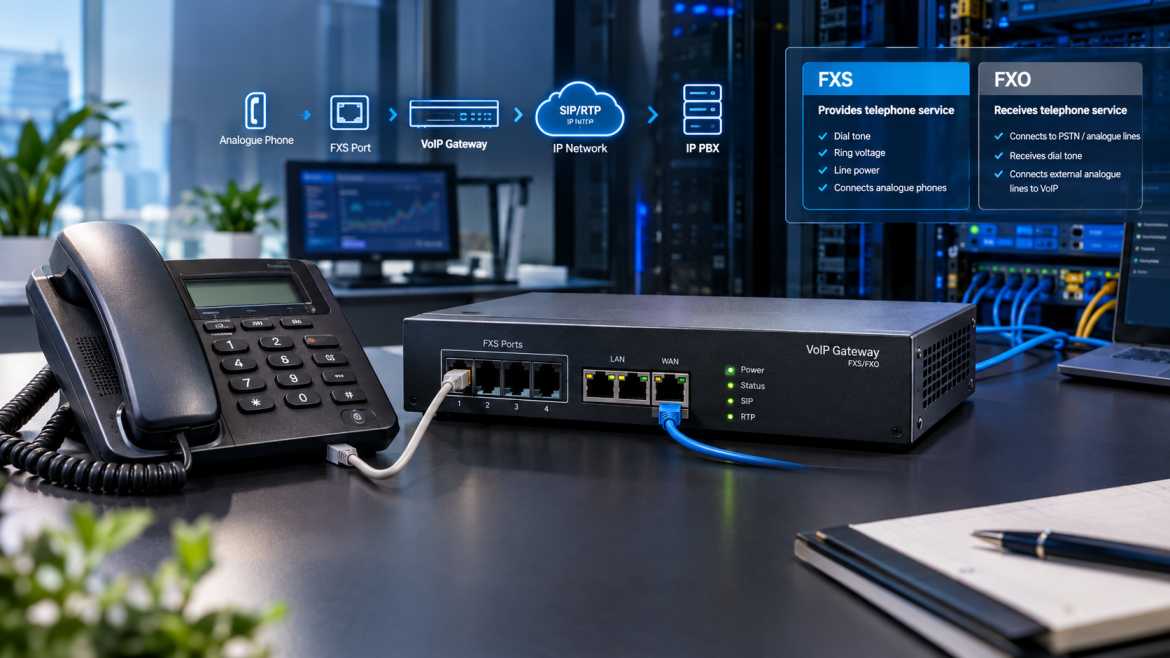
If you have spent any time working with analogue phones, PBX systems, or VoIP gateways, you have come across the term FXS port. This is one of those telecom terms that people throw around all the time but rarely explain properly – most articles either dumb it down into a one-line definition or bury it in jargon without ever explaining how it actually behaves on the wire.
This article doesn’t either. An FXS port (Foreign Exchange Station port) is the interface that provides analogue telephone service — dial tone, ring voltage, and line current — to a standard analogue phone, fax machine or similar device. This is the piece that keeps a traditional corded telephone working even as your organisation has moved to SIP and IP-based calling.
There are three main locations where FXS ports can be found: standalone FXS gateways, IP PBX systems with integrated analogue ports, and analogue telephone adapters (ATAs). Behind every business that needs to keep an analogue handset, fax machine, intercom or door phone alive on a modern VoIP network is an FXS interface doing the dirty work.
What an FXS port actually is at the signalling level, how it works electrically and logically, how it compares to an FXO port, how it fits into a SIP/RTP call flow, how to configure and troubleshoot one, and how to size an FXS gateway for a real deployment – whether that be a small office, a hotel or a multi-floor enterprise – will be covered in this guide. Where relevant, we refer to AKOM Technologies, who manufacture analogue gateway hardware for the VoIP industry.
Short Answer: An FXS port is a physical interface that offers analogue telephone line service (dial tone, ring voltage, battery current) to a device such as an analogue telephone or fax machine. It acts like a mini phone exchange for anything plugged into it and is the 'station' side of the interface.
Plain English: In the classic telephony sense, “foreign exchange" just meant providing telephone service to a place that was some distance away from the central office. FXS and FXO are the two ends of that circuit.
• FXS (Foreign Exchange Station) — the interface that is the telephone company. It produces a dial tone, provides ring voltage, provides loop current and detects the on-hook/off-hook state. It connects to an analogue station device (telephone, fax or similar endpoint).
• FXO (Foreign Exchange Office) – the interface that acts like the telephone. It goes off hook to request service, grabs the line and gets a dial tone from whatever is on the other end. It links to a line that is in service, typically a PSTN trunk or an FXS port.
In a VoIP environment, an FXS port is almost always on a gateway or an IP PBX. It sits between the analogue world and the IP network. It takes electrical signalling and analogue voice and converts it to a format that can be carried as SIP-controlled RTP traffic and back again. The device plugged into an FXS port doesn't need to know anything about IP, SIP or codecs; all the phone sees is that it's just plugged into a phone line.
The easiest way to understand an FXS port is to go through the end-to-end process of someone picking up an analogue phone connected to it.
1. Idle state. The FXS port always provides line/battery voltage to the attached phone, whether or not a call is in progress. This is what lets the phone detect ringing, and it powers basic analogue phones without external power.
2. Off-hook detection. When the handset is lifted, the phone's internal circuit closes (loop closure), and the FXS port detects the drop in loop resistance. This informs the gateway or PBX that the user wants to make a call.
3. Ringtone. The FXS port provides a dial tone to signal the caller that the line is ready to accept digits.
4. DTMF (Digit collection) As the user dials, the FXS interface detects DTMF tones (or, less commonly, pulse dialling) and passes the collected digits to the gateway's call-processing logic.
5. Call setup using SIP. Once the minimum number of digits needed to match a dial plan rule are collected, the gateway will generate a SIP INVITE to the configured SIP server, IP PBX, or SIP trunk provider with the dialled number as the destination.
6. Media negotiation: SIP signalling and SDP (Session Description Protocol) exchange negotiate the codec, IP address and RTP port that both ends will use for the actual voice stream.
7. Analogue to Digital Conversion The DSP (digital signal processor) in the gateway digitises and encodes the analogue voice coming from the phone’s handset into RTP packets using the negotiated codec.
8. Packet forwarding. The IP network carries RTP packets with encoded voice to the far end.
9. At the far end, the conversion in reverse. If the far end is another analogue device, the FXS gateway reconverts the RTP stream to an analogue signal and outputs it to the attached phone.
10. Call disconnect/on-hook. If either party hangs up, the loop closure is broken, the gateway sends a SIP BYE and the RTP stream is torn down.
It is useful to break down what is happening into two separate planes:
• Signalling plane, i.e., all the setup, management, and teardown of the call: loop-closure detection, DTMF digits, SIP INVITE/180/200/ACK/BYE messages, and SDP negotiation.
• Media plane – the actual voice payload, carried as RTP packets once the call is established, using whatever codec was negotiated.
That separation is important for troubleshooting. You can have a call that registers and rings perfectly (the signalling is fine) but never has audio in one or both directions (a media-plane/RTP problem). We’ll come back to this in the troubleshooting section.
An FXS interface provides a specific, well-defined set of electrical and signalling functions. What it really provides:
• Battery/line voltage — DC voltage which powers the loop and allows the connected device to signal on-hook/off-hook state. The exact voltage is implementation-defined and varies by manufacturer and regional standard.
• Dial tone – Audible signal indicating the line is ready for dialled digits.
• Ringing voltage – an AC signal superimposed on the line to ring the connected telephone. Ring voltage levels and frequency vary by country and hardware design.
• Ring cadence – the pattern of on/off ringing (e.g., ring-pause-ring), which also varies regionally and is often configurable on the gateway.
• Hook-state detection – ascertaining the idle (on-hook) or in-use (off-hook) state of the attached device from loop current.
• DTMF detection — detecting tone pairs produced when dial pad keys are pressed.
• Caller ID signalling – sending caller ID information (usually in a regional standard such as Bellcore/Telcordia FSK or ETSI formats) between ringing cycles or before the first ring, depending on the standard.
• Voice transmission — carrying the analogue voice signal in either direction during a live call.
• Impedance matching – matching the electrical impedance of the port to the connected line/device to minimise signal reflection and echo. The standard values of impedance differ from country to country and from equipment to equipment.
• Echo cancellation — many FXS gateways incorporate DSP-based echo cancellation to reduce the acoustic and electrical echo that naturally occurs in analogue-to-digital conversions.
These values (voltage, impedance, cadence, Caller ID format) are determined by national telecom standards and specific hardware design, so they are never universal – always implementation-dependent and usually configurable in a country-specific profile on quality gateway hardware.
This is one of the most searched comparisons in telephony and also one of the most consistently confused ones. The best way to remember it is:
|
Feature |
FXS |
FXO |
|
Full form |
Foreign Exchange Station |
Foreign Exchange Office |
|
Connects to |
Analog end devices (phones, fax machines) |
A line providing service (PSTN trunk or an FXS port) |
|
Provides dial tone |
Yes — generates it |
No — receives it |
|
Provides line power |
Yes — supplies battery/loop voltage |
No — draws power from the line |
|
Receives PSTN line |
No |
Yes |
|
Typical endpoint |
Analog telephone, fax machine, intercom, alarm panel |
PSTN copper line, PBX trunk port |
|
Typical gateway application |
Connecting analog phones to a VoIP/SIP network |
Connecting a legacy PSTN line into a VoIP network |
|
PBX relationship |
Extends the PBX/IP PBX out to analog phones |
Brings an external analog trunk into the PBX/IP PBX |
|
Signaling role |
Acts like a central office / exchange |
Acts like a subscriber telephone |
In practice, most companies that continue to use the PSTN over analogue copper lines will use an FXO gateway to bring those lines into their VoIP/IP PBX system, with an FXS gateway on the other side to keep existing analogue phones, fax machines or intercoms working over that same VoIP network. Many deployments use both at the same time.
A VoIP gateway with FXS is the hardware bridge between an analogue device and the IP network. This is the basic architecture:
Analogue Phone
↓
FXS Port
↓
VoIP Gateway
↓
SIP / RTP
↓
IP Network
↓
IP PBX / SIP Server Walking through it:
• The analogue phone is physically connected (usually RJ11) to the FXS port on the gateway.
• The VoIP gateway takes care of all analogue to digital conversion, DTMF detection, echo cancellation and codec encoding.
• The gateway registers as a SIP endpoint (or a group of endpoints, one per port) to an IP PBX or SIP server, using standard SIP signalling for call control.
• RTP carries the actual voice media after a call is connected.
• The SIP signalling and RTP media between the gateway and the PBX/SIP infrastructure travel over the IP network.
That’s precisely why organisations use FXS gateways; they allow you to move to VoIP without having to throw away working analogue equipment. Reception desks, lobby phones, fax lines, lift emergency phones and intercoms are often left on analogue wiring because it’s not practical or necessary to replace them. An FXS gateway makes that hardware fully usable on a SIP-based network. For example, AKOM has a range of FXS Gateways, from 2-port units for small offices to high-density models for large-scale analogue device migrations.
It’s worth being specific here, because this is a point of real confusion: FXS is not a VoIP protocol. It is an analogue telephony electrical and physical interface standard. SIP is the gateway signalling protocol on the IP side.
• FXS does all the analogue side: loop current, dial tone, ringing, DTMF, and voice as an analogue waveform.
• SIP (Session Initiation Protocol) – Call signalling on the IP side, including registration, authentication, call setup (INVITE), call progress, and termination (BYE).
• RTP (Real-time Transport Protocol) actually carries the voice media once a call is established and encoded.
• SDP (Session Description Protocol) exchanged within SIP messages describes media parameters used by both sides – codec, IP address, port number and other media related attributes.
• SIP registration is when the gateway (or each FXS port, depending on configuration) advertises itself as available to receive calls, authenticating against the SIP server/PBX with credentials.
• SDP exchange is where codec negotiation happens, with both endpoints agreeing on a common audio codec before RTP media is transmitted.
The FXS gateway's job is to faithfully translate between these two worlds -- analogue signalling and SIP/RTP -- without the analogue phone ever needing to "know" it's on a VoIP network.
FXS ports are found where an organisation needs to keep analogue devices running on IP infrastructure:
• Legacy PBX integration – a phased migration that bridges an ageing analogue PBX extension or key system phone into a SIP-based environment.
• Mixed endpoints VoIP deployments – organisations deploying SIP phones throughout the organisation but with a handful of analogue devices for cost or compatibility reasons
• Hotels – analogue phones in rooms are very common; FXS gateways enable a property to run a centralised SIP/IP PBX system while using simple, low-maintenance analogue handsets in guest rooms.
• Hospitals – in clinical areas, analogue phones are often preferred for reliability, simplicity and not having to rely on a powered network switch at every bedside.
• Offices – reception desks, conference rooms and fax machines are often still on analogue lines even after a wider SIP rollout.
• Call centres: Some agent stations or supervisor lines are still analogue because of redundancy or compatibility with recording/logging equipment.
• Residential telephony — Analogue cordless handsets that plug into a home ATA/FXS port and a VoIP service.
• Intercom and door-phone systems — Many analogue intercoms and gate phones use simple loop-start signalling that is natively supported by an FXS port.
• Fax integration – fax machines are very sensitive to packet loss and jitter, and a properly configured FXS gateway with T.38 or a high-bitrate codec can keep the reliability of fax over IP.
• Industrial and facility communication systems — emergency phones, lift phones and alarm panels typically use simple analogue loop-start circuits, which are easiest to preserve via FXS.
• Analogue infrastructure migration — any scenario where an organisation wants to migrate its trunking and call routing to SIP without rewiring every desk.
The common thread: FXS enables organisations to protect their existing analogue investment while enjoying the routing, scalability and cost advantages of a SIP-based voice network.
It helps to separate this into physical cabling steps and SIP/software configuration steps, as they are dealt with at completely different layers.
1. Connect the analogue telephone to the FXS port on the gateway using a standard RJ11 telephone cable.
2. Connect the gateway itself to your LAN using an Ethernet cable (or configure Wi-Fi if your model supports it).
3. Set the gateway’s IP/network settings – DHCP or static IP, depending on your network design.
4. Set up an SIP account or extension for each FXS port on your SIP server or IP PBX, with an SIP username and authentication credentials.
5. Configure codec preferences on the gateway supportable by your SIP server/PBX and network conditions.
6. Configure the dial plan so that the gateway knows how to route dialled digits (local extension, outbound trunk, emergency numbers, etc.).
7. Register the gateway to the SIP server/PBX and confirm the registration status is successful.
Test:
8. Place an inbound call to verify that the analogue phone rings and that audio can be heard both ways.
9. Conduct an outbound call to verify proper functioning of dial tone, digit collection and call completion.
10. Ensure DTMF (i.e., navigating an IVR) and Caller ID display work as expected.
Most FXS-capable gateways expose a per-port set of configuration parameters. Knowing what each one does will help you avoid the most common mistakes when deploying:
• SIP server address – IP/hostname of the SIP registrar or IP PBX to which the port will register.
• SIP username/authentication credentials – Identifies and authenticates the port (or extension) to the SIP server.
• SIP transport — The transport protocol used for SIP signalling (usually UDP, sometimes TCP or TLS depending on the gateway and PBX).
• RTP port range – the range of UDP ports used for media streams. This must be allowed through any firewall/NAT device.
• Codec choice and priority – what audio codecs the port will offer/accept and in what order of preference.
• DTMF mode: how DTMF digits are signalled across the IP network (usually in-band, or out-of-band via RFC 2833/RTP telephone-event, or SIP INFO, depending on support by gateway and PBX)
• Dial plan – the rules for interpretation and routing of dialled digit sequences
• Caller ID method—the regional signalling standard used to send Caller ID data to the connected phone.
• Ring settings / cadence – the pattern of ring applied to the port, often adjustable to suit regional norms.
• Polarity reversal — A signalling event (reversing line polarity) sometimes used to indicate call answer/disconnect. It is relevant for equipment such as payphones or certain call accounting systems.
- Echo cancellation -- parameters for tuning the DSP echo canceller, useful for longer analogue loops.
• Jitter buffer -- buffer to smooth out variation in RTP packet arrival timing before playout.
Gain control — adjust transmit/receive audio levels to compensate for line loss or excessively loud/quiet audio.
• Regional telephony settings—a profile with voltage, cadence, Caller ID format, and tone frequencies for a country’s telecom standards.
• FXS impedance – The terminating impedance of the port, which should be matched to the line/device it is connected to, so as to minimise echo. Ideal values vary by country and equipment.
• Hook flash settings – the window of time used to tell if a flash-hook event was deliberate or accidental on-hook.
Exact recommended values for these parameters vary by manufacturer, firmware version, and regional telecom regulations and must be set according to your specific gateway's documentation and your local carrier / PBX requirements and not generic defaults.
The FXS port is constantly monitoring the loop current on the line. When the handset is lifted, the phone closes the loop and current flows, and the port sees an off-hook event. This is the trigger for dial tone and call initiation. Hanging up opens the loop again. This signals on-hook and in an active call triggers call teardown.
The FXS port provides an AC ringing signal to the line in a certain on/off pattern (cadence) to alert the attached phone of an incoming call. This signal is picked up by the phone's ringer. Exact ring voltage, frequency and cadence are determined by regional standards and are typically configurable on the gateway to suit local requirements.
DTMF (dual-tone multi-frequency) signalling is a way for a phone to send digits on its keypad. Every key you press generates a pair of audio frequencies. The FXS port (or DSP in the gateway) recognises these tone pairs and translates them into digit events. These events are then used to match the dial plan or, if there is an ongoing call, are passed to the far end using in-band audio, RFC 2833 RTP events or SIP INFO messages, depending on the configuration.
Caller ID delivery on analogue lines follows regional standards . For example, caller ID in North America is often sent using FSK-based signalling, but other regions use different formats. The FXS port is where this data is formatted and sent to the phone attached to it at the appropriate point in the ringing sequence; support/format depends on the gateway hardware and configured region.
A hook flash is a brief on-hook signal (shorter than an actual hang-up) used to activate services such as call waiting, call transfer, or three-way calling on the attached phone system. The FXS port uses a configurable timing window to determine whether a flash is different from a real disconnect. If the window is too short, valid flashes might be missed. If the window is too long, a real hang-up might be interpreted as a flash.
When analogue voice comes into an FXS port, the DSP in the gateway digitises it and encodes it with the codec negotiated for that call. Common codecs found on FXS gateways are:
• G.711 – a high-quality, uncompressed codec commonly used on LANs and short-haul VoIP links. It requires more bandwidth than compressed codecs but has little encoding delay and wide compatibility.
• G.729 – a compressed codec which greatly reduces bandwidth usage, useful over constrained WAN links, but it requires more CPU/DSP resources to encode/decode and has a small quality trade-off against G.711.
• Opus — a modern, highly flexible codec that supports a wide bitrate range, if supported by the specific gateway and SIP server/PBX.
• Bandwidth – compressed codecs take up less bandwidth per call. This is important when many concurrent calls are run over a limited WAN link.
• Voice quality – is often tied to the bitrate, but modern compressed codecs can sound very close to uncompressed audio at moderate bitrates.
• Latency — some codecs introduce more processing delay than others, which impacts the perceived responsiveness of the call.
• CPU/DSP requirements — compression is more CPU intensive, which is something to think about for gateways supporting a large number of concurrent ports.
• Compatibility — All FXS Gateways do not support all codecs, and codec support should always be checked against the datasheet of the specific hardware and not just assumed.
A good troubleshooting step is to determine if a fault is on the physical/analogue layer or the SIP/VOIP layer.
|
Problem |
Possible Cause |
Troubleshooting |
|
No dial tone |
Bad cabling, port not provisioned, gateway not powered/booted, port disabled in config |
Check RJ11 cable and phone on another known-good port; confirm port status in the gateway admin panel; verify gateway power and boot status. |
|
The phone does not ring. |
Incorrect ring cadence/voltage profile, incoming call not routed to the port, SIP INVITE not reaching the port |
Verify regional ring settings; check dial-plan/routing rules on the PBX; confirm SIP INVITE is arriving at the gateway (via logs). |
|
One-way audio |
NAT/firewall blocking RTP in one direction, asymmetric RTP path, incorrect RTP port range configured |
Check NAT/firewall rules for the RTP port range; confirm SIP ALG is disabled if causing issues; review SDP for correct IP addressing. |
|
No incoming calls |
SIP registration failure, incorrect dial-plan/trunk routing, firewall blocking SIP signalling |
Check SIP registration status; verify inbound routing rules on the PBX/trunk provider; confirm SIP port isn't blocked |
|
No outgoing calls |
Dial plan mismatch, SIP authentication failure, trunk/route configuration error |
Review dial-plan pattern matching; check SIP credentials and registration; test with a simplified dial-plan rule. |
|
DTMF not working |
Mismatched DTMF mode between gateway and PBX (in-band vs. RFC 2833 vs. SIP INFO) |
Align DTMF mode settings on both the gateway and the SIP server/PBX; test with a known-working DTMF method |
|
Caller ID not displayed |
Incorrect regional caller ID format, phone incompatible with configured standard, timing misconfiguration |
Confirm the gateway's caller ID format matches the connected phone's expected regional standard. |
|
Voice quality problems |
Network jitter/latency, codec mismatch, insufficient bandwidth, DSP misconfiguration |
Check network jitter/packet loss with diagnostic tools; review codec selection; assess available bandwidth against concurrent call count. |
|
Echo |
Impedance mismatch, echo canceller disabled or misconfigured, long analogue loop length |
Adjust the FXS port impedance setting to match the connected line/device; enable/tune echo cancellation; check cable length and quality. |
|
SIP registration failure |
Incorrect SIP credentials, network/firewall blocking signalling port, SIP server unreachable |
Verify SIP username/password and server address; check firewall rules for the SIP signalling port; confirm connectivity to the SIP server. |
1. Physical Layer first – check cabling, and make sure the FXS port is active/registered on the status page of the gateway.
2. Next SIP layer – verify that the registration was successful, and check the SIP logs for invite/response codes.
3. NAT and firewall – A significant percentage of “one-way audio” and registration issues are related to NAT traversal or blocked RTP/SIP ports.
4. RTP and codec compatibility — check that the two ends actually negotiated a common codec and that the RTP stream is flowing.
5. Dial plan and regional settings — many “call doesn’t complete” problems are dial-plan pattern mismatches, not hardware faults.
6. Network quality — latency, jitter, and packet loss degrade voice quality even if signalling and routing are correct.
A common mistake is to choose an FXS gateway by port count alone; port count only indicates how many analogue devices can connect physically, not whether the gateway will perform well under real call load or integrate cleanly with your SIP infrastructure. Assess:
• Number of FXS ports: This should equal the number of analogue devices that you want to connect.
• SIP account capacity – the number of SIP registrations the gateway can support at the same time.
• Concurrent call capacity – the maximum number of active calls that the hardware's DSP can handle at the same time, which may be less than the port count when the hardware is heavily loaded.
• Codec support – Support the specific codecs your PBX/trunk provider requires.
• SIP compatibility – Does it work with your specific IP PBX or SIP trunk provider? (Some platforms are pickier than others regarding SIP dialects.)
• RTP support – Correctly handle RTP streams, including RFC 2833 DTMF relay when appropriate.
• DTMF-supported methods – in-band, RFC 2833 and/or SIP INFO.
• Caller ID support – formats relevant to your deployment region.
• Fax/T.38 support – if you want to reliably send faxes over IP, don’t assume that a standard codec-based fax will work; ask specifically for T.38 support.
• Echo cancellation quality — more important on longer analogue runs or higher call volumes.
• VLAN support — useful for isolating voice traffic in large networks.
• QoS support—helps to give voice traffic priority over data traffic on busy links.
• IPv4/IPv6 support—as appropriate to your network’s addressing scheme.
• TLS/SRTP support -- for encrypted SIP signalling and media where security requirements dictate.
• Network interfaces — single or dual Ethernet, presence of a built-in switch, etc.
• Redundancy: power supply redundancy or failover capability for mission-critical deployments.
• Management interface – web GUI, provisioning protocols, and bulk-configuration tools for larger port counts.
• Firmware and security update cadence – a well-maintained gateway reduces long-term exposure to vulnerabilities.
• Compatibility with your particular IP PBX platform – worth checking or testing before a large deployment, especially for high-density gateways.
AKOM’s FXS Gateway family directly addresses this scaling curve – from 2-port and 4-port units for small offices to 16/24/32-port models for growing sites, to 48/72/96-port units designed for large-scale analogue device consolidation.
How many FXS ports do you require? It's beyond the simple "How many phones do we have?" Consider this:
•Number of analogue endpoints – phones, fax machines, intercoms and any other analogue device that needs a port.
• Simultaneous calls – port count and simultaneous call handling are not the same spec. A gateway may have more physical ports than its DSP can handle simultaneously at full load – check the rated concurrent call capacity of the gateway, not just the port count.
• Existing telephone infrastructure – if you’re replacing an old analogue PBX entirely or integrating alongside it.
• PBX architecture – centralised IP PBX with distributed FXS gateways or a PBX with integrated analogue ports.
• Future expansion — sizing for near-term growth means no forced hardware swap a year from now.
• Fax/intercom requirements – these are often not thought of when doing the initial port counts and then become a scramble later on.
• Small office (5-10 analogue phones, 1 fax line): A 2-port or 4-port FXS gateway will usually cover this, or a small IP PBX with built-in analogue ports.
• Boutique hotel (20-40 rooms with in-room analogue phones): 16- or 24-port gateway, depending on number of rooms and any additional back-office analogue lines.
• Multi-floor office (mixed SIP and analogue endpoints, 50 analogue devices): 32-port or higher-density gateway, usually deployed per floor or per wiring closet for cabling convenience.
• Large enterprise/hotel property (100+ analogue endpoints): many high-density gateways (e.g., 48/72/96-port units) spread throughout the site tied back to a central IP PBX or SIP core.
In any event, planners should use the actual simultaneous call volume, not just the number of devices. For example, a hotel with 100 rooms likely does not have 100 simultaneous active calls, but a call center with 32 analogue agent stations may have as many as 32 concurrent calls at its peak.
These terms are used almost interchangeably, but they are not the same:
• FXS gateway: a dedicated device that provides multiple FXS ports (typically 2 to 96+) built for business/enterprise deployments that require a number of analogue lines to be attached to a VoIP network.
• Analogue Telephone Adapter (ATA)—Small device with low port count (often 1-2 FXS ports) for residential/very small office use, converting 1 analogue phone line to SIP.
• VoIP gateway — a more general term that includes FXS gateways, FXO gateways and PRI/E1/T1 gateways. This term refers to any device that connects legacy telephony (analogue or digital) to an IP network.
• IP phone – A SIP phone with SIP built in natively, not requiring any FXS port at all as it connects directly to the IP network.
• A single home line or a very small office with one or two analogue telephones will use an ATA.
• You should use an FXS gateway when you need to connect multiple analogue devices at business scale, with centralised management and more port density.
• Use an IP phone if existing analogue hardware does not need to be maintained, and a native SIP endpoint is easier to deploy and manage.
There are two types of gateways. Both exist to bridge analogue telephony with IP networks, but they solve opposite problems:
FXS Gateway — connects an IP PBX (or SIP server) to analogue phones:
Analogue Phone → IP PBX → FXS Gateway
Use case: You have call control in the IP PBX, and you want to extend that service to analogue handsets, fax machines, or intercoms.
FXO Gateway—connects an IP PBX to the PSTN or an existing analogue trunk:
Use case: You still have live analogue phone lines from a carrier and want to route calls on those lines through your SIP-based IP PBX, instead of replacing the lines altogether.
Many real deployments use both at the same time. FXO gateways bring in existing analogue trunks, and FXS gateways extend service out to analogue phones – with the IP PBX and SIP infrastructure in the middle managing call routing between the two. This very combination lies at the core of the AKOM combined FXO/FXS Gateway range.
An FXS gateway is a network-attached device that has SIP registration credentials and thus must be treated with the same security discipline as any other network endpoint:
• SIP authentication – require authenticated SIP registration and never leave ports open to anonymous SIP invites.
• Strong Credentials – Assign non-default usernames and strong passwords to every SIP account/extension.
• Network segmentation / VLANs – segregate voice traffic from general data traffic to minimise exposure and reduce the blast radius of a compromised device elsewhere on the network.
• Firewall rules – restrict SIP and RTP traffic to known, necessary IP ranges and ports instead of wide exposure.
• Prevent SIP abuse/toll fraud – watch for unusual outbound calling patterns, which is a common indicator of a compromised gateway used for toll fraud.
• Secure management access – Limit the admin/web interface of the gateway to trusted management networks and change the default admin credentials immediately after deployment.
• Firmware updates – keep the gateway firmware up-to-date to receive security patches from the manufacturer.
• TLS/SRTP -- where supported by the gateway and PBX, use encrypted SIP signalling (TLS) and encrypted media (SRTP) for sensitive deployments.
• Limit admin interfaces – disable remote/WAN-facing admin access unless explicitly needed and prefer VPN access for remote management.
• Watch for failed registrations and strange call activity – a series of failed SIP registration attempts or strange call volume/destination are early indicators of an attempted breach.
What does 'FXS port' mean?
An FXS (Foreign Exchange Station) port is the analogue telephony interface that provides dial tone, ringing voltage and line current to a telephone set (or fax machine). It is the interface on the gateway or IP PBX that allows connection of an analogue telephone (or fax machine) to the VoIP network.
What does an FXS port hook up to?
The FXS port connects to analogue end devices such as telephones, fax machines, intercoms, and so on.
Will an FXS port provide a dial tone?
Yes. Dial tone generation is one of the key features of an FXS interface, while an FXO port receives dial tone rather than generating it.
FXS versus FXO: What’s the difference?
FXS provides telephone service (dial tone, ring voltage, line power) to a connected device. FXO receives that service and requests a line, going off-hook like a telephone. FXS is for hooking up phones; FXO is for hooking up lines.
Can an analogue phone be plugged directly into an FXS port?
Yes, a standard RJ11 cable. No adapter required; the FXS port provides native analogue line service. Are FXS and VoIP the same? No, FXS is a physical/analogue interface standard; it is not a VoIP protocol. It is only part of a VoIP deployment when combined with a gateway that translates its analogue signalling into SIP/RTP for transmission over an IP network.
How many phones does one FXS port support?
One analogue device per FXS port. This is the way a standard analogue telephone line is intended to work. Some arrangements have analogue splitters for auxiliary ringers, but that is not standard for primary phone connections.
What is an FXS gateway?
An FXS gateway is a hardware device that provides multiple FXS ports and is used to connect multiple analogue devices to a VoIP/SIP network at once. These devices are commonly used in offices, hotels and enterprises that retain analogue telephony hardware.
Does FXS work with an IP PBX?
Yes. Some IP PBX models have FXS ports built in, or you can add an FXS gateway that registers as SIP extensions on the IP PBX.
Why do I have no dial tone on my FXS port?
Common causes include a bad cable or a disconnected cable, the port is disabled or unprovisioned in the gateway configuration, or the gateway is powered off or not fully booted. Usually the easiest diagnosis is to look at the port status in the gateway admin interface.
Does the FXS port support fax?
Many FXS gateways do support fax transmission, but its reliability is codec dependent, as well as dependent on whether or not the T.38 fax relay is supported and configured properly. Not every gateway, nor every codec, is guaranteed to support fax reliably, so this must be verified against the actual hardware in question and not assumed.
How to Configure an FXS Port?
Configuration typically requires entering the SIP server address, SIP username/credentials, codec preferences, dial plan and regional telephony settings (ring cadence, Caller ID format) via the gateway’s admin interface, then verifying a successful SIP registration has been achieved before testing calls.
Summary
An FXS port is a small piece of hardware that does one very specific thing: it makes an analogue telephone think it is plugged into a traditional phone line, while behind the scenes it quietly connects that to a SIP-based VoIP network. Knowing how it works – from loop current detection and dial tone creation all the way through SIP signalling, SDP negotiation and RTP media – makes it a lot easier to correctly design, configure and troubleshoot analogue integrations, as opposed to treating the gateway as a black box.
Whether you’re supporting a handful of analogue phones in a small office or gearing up for a 96-port rollout across a hotel or enterprise campus, the basics are the same: align your port count and concurrent-call capacity with actual usage, nail SIP and dial-plan configuration from the get-go, and don’t forget the security basics that go with putting an analogue gateway on your network. This is precisely the kind of scaling that the AKOM range of FXS Gateway and FXO/FXS Gateway hardware is designed to support, from small 2-port units through to high-density 96-port systems for large deployments.
Subscribe to our newsletter for a weekly dose of news, updates, helpful tips, and exclusive device.
 sales@akom.in
 +91-9811829876